
Enterprise onboarding
This section is for enterprise accounts provisioned by sales. If you registered and fund your account on the FUMO website, use the online quickstart. Use the key issued by the matching console; do not mix credentials and endpoints. Binding a Sales Code does not change your access channel.
Set up your account and key
- Contact sales and provide your email address. Contact FUMO Lab sales and share the email address where you want to receive your test account credentials.
- Receive your test account. Sales will provision a test account. The username and password will be sent to the email address you provided.
- Sign in to the console. Use the emailed username and password to sign in to the Enterprise console↗.
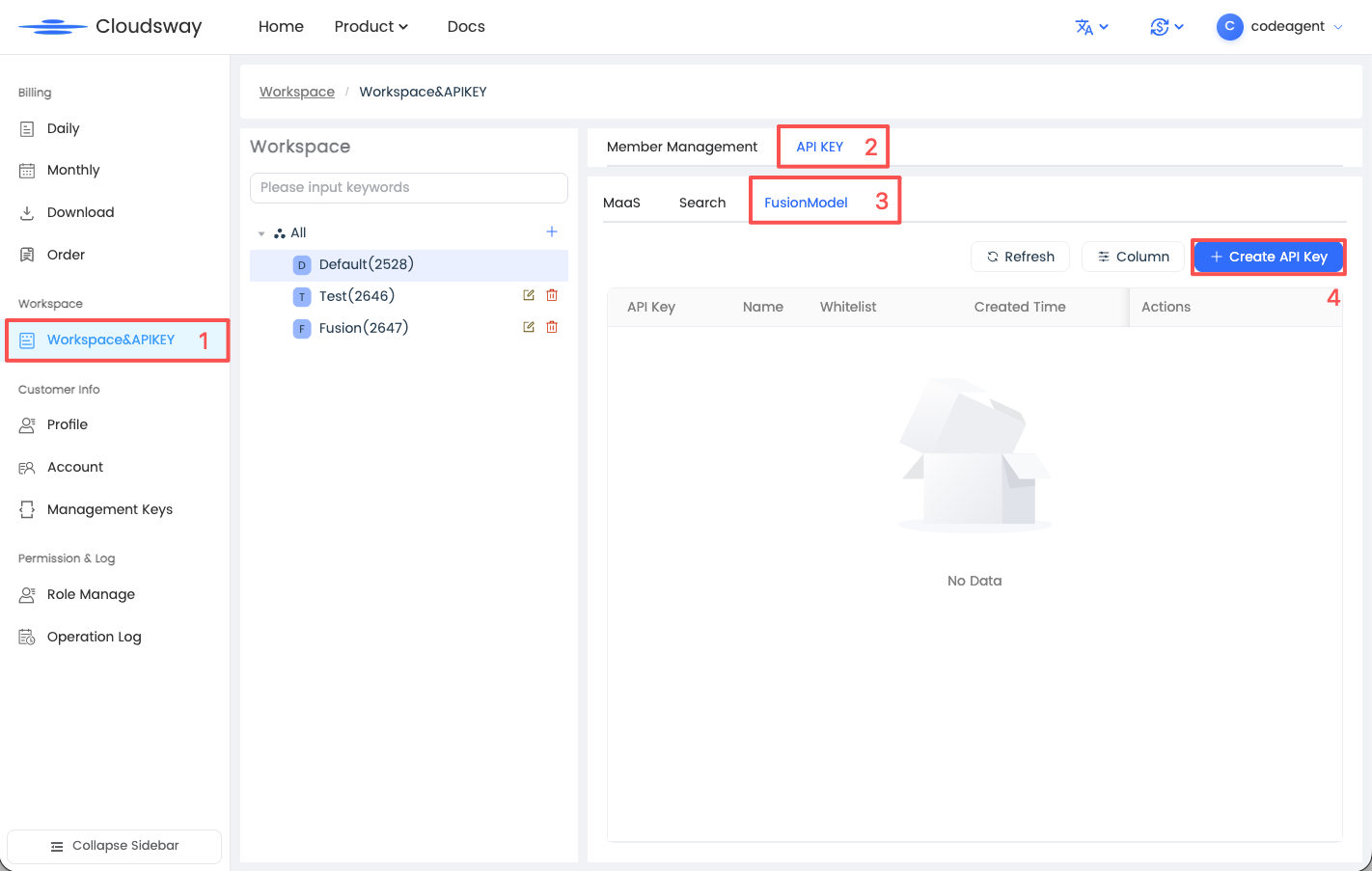
- Create an API key. Follow the numbered steps in the screenshot below:
- Open Workspace&APIKEY in the sidebar and select the workspace you want to use.
- Switch to the API KEY tab.
- Select FusionModel.
- Click Create API Key and complete the creation process.
If sales has already provided your account, start at step 3.
Choose a Base URL
| Model resources | Base URL |
|---|---|
| International resources, including every Fusion model | https://api.fumolab.ai/v1 |
| Domestic Chinese model resources | https://model-api.xiaosuai.com/v1 |
Choose by model resource, not your location. Both Fusion Max and Fusion Code use the international endpoint. Confirm domestic model IDs and access with your sales representative.
Make your first Fusion request
Store the key created in the Enterprise console in an environment variable, then call an authorized Fusion model:
export FUMO_API_KEY="your-cloudsway-key"
curl https://api.fumolab.ai/v1/chat/completions \
  -H "Authorization: Bearer $FUMO_API_KEY" \
  -H "Content-Type: application/json" \
  -d '{"model":"fusion-max-1.0","messages":[{"role":"user","content":"Hello"}]}'
Configure a coding agent
Open a coding-agent guide and select “Enterprise” in the Fusion configuration table.
These guides describe Fusion models. Confirm domestic resource protocols and capabilities with sales. For permission or protocol errors, ask your representative to confirm the model and endpoint are enabled.
Account and billing
Manage enterprise accounts in the Enterprise console↗. Contact your representative about credits, settlement, and provisioning. Card binding and top-ups in FUMO Dashboard apply to online self-service accounts.